
Installation Guide: Setup IPTV on Amazon Fire Stick 4K, Smart TV & Android (2026 Edition)
Unlock the full potential of your Amazon Fire Stick 4K or Android device. If you are looking for the best cheap Sky TV streaming fire stick solution, you are in the right place. Our step-by-step guide helps you install the #1 rated UK service in under 5 minutes to enjoy buffer-free sports and movies
🔥 Amazon Firestick / Fire TV Setup
Optimizing your Fire Stick 4K for streaming requires enabling developer options first. Follow these steps to prepare your device for the ultimate entertainment experience.
Here is your Amazon Firestick / Fire TV Stick Setup Guide:
Step 1 – Prepare Your Device
* From the home screen, go to Settings → My Fire TV → Developer Options.
* Enable Apps from Unknown Sources.
Step 2 – Download the Downloader App
* Search for Downloader in the Amazon App Store.
* Install and open it.
Step 3 – Install IPTV Smarters Pro
* In the Downloader URL field, type:
Enter this Short Code: 78522
* Once downloaded, install and open.
Step 4 – Enter Your Credentials
* Choose Login with Xtream Codes API.
* Enter the username, password, and URL from your IPTV email.
* Click Add User → wait a few seconds → enjoy streaming.
* Tip: For best results, reboot your Fire TV Stick after installation.*
🖥️ Smart TV (Samsung, LG, Sony, etc.)
Facing issues with your Fire Stick 4K? Here are quick fixes to optimize your streaming.
Here is your Smart TV (Samsung, LG, Son,y etc.) Setup Guide:
Step 1 – Find the App Store
* Samsung TV: Smart Hub Store
* LG TV: LG Content Store
* Sony TV: Google Play Store
Step 2 – Install an IPTV App
* Recommended: Smart STB, Smart IPTV, SET IPTV
Step 3 – Add Your Playlist
* Launch the app → you’ll see a MAC address.
* Visit the app’s official portal website on your computer.
* Enter your MAC address and the M3U URL from IPTV UK Services.
Step 4 – Reload Your App
* Restart your TV → the channel list loads automatically.
Note: Some apps (like Smart IPTV) offer a short trial, then require a one-time activation.
Android Setup (Samsung, Xiaomi, Pixel)
Step 1: Download the App 🛒 Go to the Google Play Store. 🔍 Search for “IPTV Smarters Pro” or “XCIPTV”. ⬇️ Click Install and open the app.
Step 2: Login Details 👋 Select “Login with Xtream Codes API”. 📝 Enter the following details:
Name: BritCast
Username: (Check your email)
Password: (Check your email)
URL: (Check your email) ▶️ Click Add User and select your profile.
iOS Setup (iPhone, iPad, Apple TV)
Step 1: Download the App 🍎 Go to the Apple App Store. 🔍 Search for “Smarters Player Lite”. ⬇️ Click Get to install the app.
Step 2: Connect Account ⚙️ Open the app and accept the Terms. 👤 Tap on “Login with Xtream Codes API”. 📝 Enter your Username, Password, and URL. ✅ Tap Add User to load your channels.
PC & Mac Setup (Windows / macOS) 💻
Here is how to watch on your Laptop or Desktop Computer:
For Windows Users 🪟 Step 1: Download the Player ⬇️ Download the IPTV Smarters Pro app for Windows. (Or search for “IPTV Smarters for PC” on Google). 📂 Open the file and install the software.
Step 2: Login 👋 Open the app and select “Login with Xtream Codes API”. 📝 Enter your Username, Password, and URL. ▶️ Click Login to start watching.
Troubleshooting Your Fire Stick 4k Streaming & App Issues
Check Internet Speed
You need at least 20 Mbps for buffer-free streaming. If using WiFi, try moving closer to the router or use an Ethernet cable
ISP Blocking
ISP Blocking (UK Users): If channels are black but the internet is working, your ISP (Sky, Virgin, BT) might be blocking IPTV. Enable a VPN to bypass this immediately.
Typo Check
Check Login Details: Usernames and Passwords are case-sensitive. Ensure there are no hidden spaces at the end or beginning of the URL.
Update App
Update Your App: Old versions of Smarters or Downloader can cause playback errors. Make sure you are using the latest version available.
Restart
Reboot Everything: A simple restart solves 90% of issues. Unplug your Firestick and Router from the power, wait 30 seconds, and plug them back in.
Clear Cache
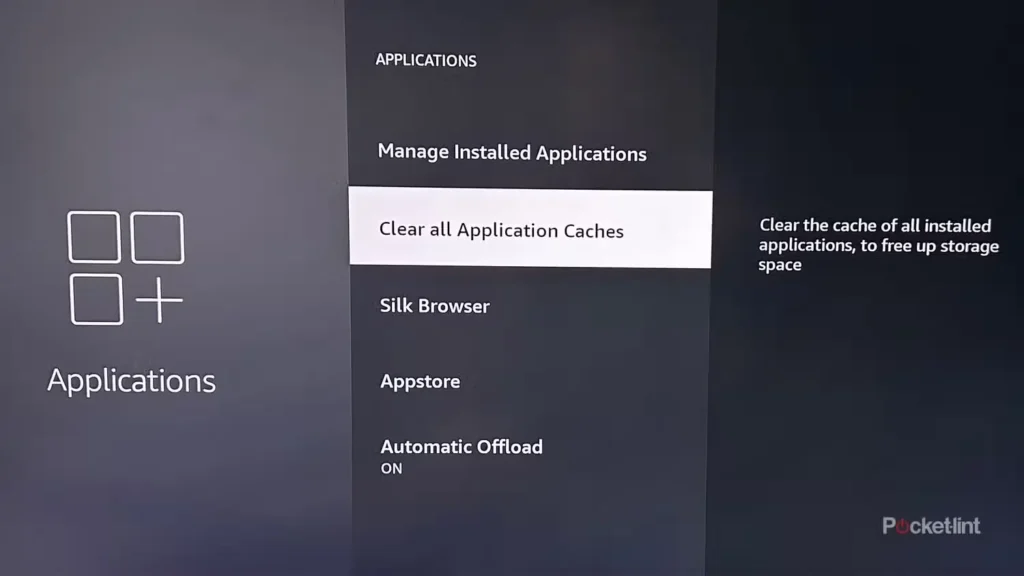
Clear App Cache: Go to Settings > Applications > Manage Installed Applications > [Your App] > Clear Cache. This refreshes the app without deleting your login.
Still Facing Issues?
If none of the above steps worked, please take a screenshot of the error message and contact our support team immediately via WhatsApp or Email
Ready to Unlock 20,000+ Live Channels?
Join the #1 Rated IPTV service for Fire Stick 4K in the UK today. Enjoy buffer-free streaming, True 4K Quality, and instant activation for your device. 7-Day Money-Back Guarantee included.