
If you need to stop IPTV buffering Firestick problems before kick-off, start with the boring fixes first. Most UK Freezes on Fire TV Stick come from weak Wi‑Fi, a stuffed app cache, or a stick that has been left running for days. The stream looks fine on your phone, then the big match stutters on the TV.
This guide walks through the order that actually saves time at home. You will clear cache, restart properly, move to 5 GHz or Ethernet, tweak the player, and only then look at VPN or provider issues. Prefer a clean trial on a stable service? Message us on WhatsApp or start an 24-hour IPTV test with BritCast.
Work top to bottom. Most UK homes fix Stop IPTV Buffering Firestick problems before they ever need a VPN.
Why Firestick IPTV buffers in UK homes
Buffering means the player ran out of video data before the next chunk arrived. On Firestick that usually points to one of five things: Wi‑Fi drops, evening network congestion, a hot or overloaded stick, a player buffer that is too small, or a weak upstream from the service itself.
UK evenings (roughly 7–11 pm) are the worst window. Flat shares, Sky Hub and Virgin hubs, and busy cabinets all add load. If the same channel is smooth at 2 am and rough at 8 pm, do not blame the Firestick alone.
Quick checks before you change anything
- Run a speed test on a phone on the same Wi‑Fi. Live HD needs a stable connection more than a big peak number. Aim for a solid, steady result rather than a one-off spike.
- Note whether other apps (BBC iPlayer, YouTube, Netflix) also stutter. If everything buffers, fix the network first.
- Check whether only one channel or event buffers. One bad feed is a provider or CDN issue, not your stick.
- Confirm the Firestick uses the official power adapter, not the TV USB port. Underpowered sticks reboot mid-stream.
Step 1: Restart the Firestick properly
A soft home-button poke is not a restart. Go to Settings → My Fire TV → Restart, or unplug power for 30 seconds and plug back in. That clears stuck background processes that eat RAM on older sticks.
Do this once a week if you leave the stick on all day. It is the cheapest habit that reduces random freezes.
Step 2: Clear IPTV app cache (and force-stop extras)
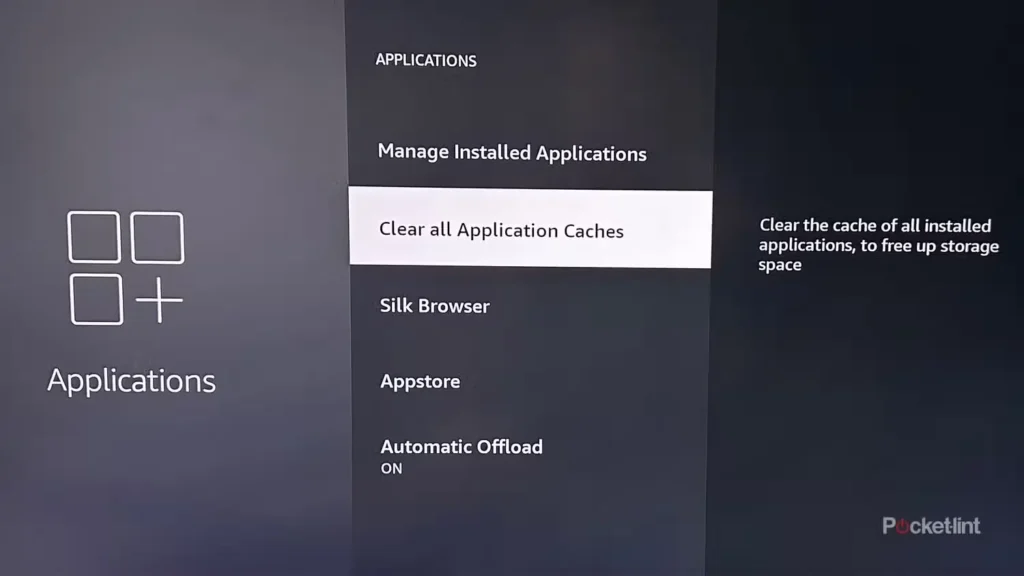
Go to Settings → Applications → Manage Installed Applications. Open your IPTV player (TiviMate, IPTV Smarters, XCIPTV, or similar). Tap Clear Cache. Leave Clear Data alone unless you are happy to log in again.
Then force-stop apps you are not watching. Amazon recommendations, unused store apps, and old players all sit in the background. One IPTV app is enough. Stacking three “backup” players often makes things worse.
Step 3: Fix Wi‑Fi or move to Ethernet
If you want to stop IPTV buffering Firestick issues for good in a busy house, wired almost always wins. Amazon’s Ethernet adapter (or a powered USB hub + adapter on models that need it) removes Wi‑Fi as the weak link.
If you stay wireless:
- Connect to the 5 GHz SSID, not the crowded 2.4 GHz band.
- Keep the stick within a few metres of the router when you can. Thick walls kill 5 GHz.
- Give the Firestick a DHCP reservation in the router so its IP does not bounce.
- Pause big downloads and cloud backups during the match.
Step 4: Cool the stick and free storage
A Firestick jammed behind a warm TV throttles. Use a short HDMI extender so air can move around the case. Check Settings → My Fire TV → About → Storage. If free space is tiny, remove apps you never open.
Step 5: Player settings that reduce live stutter
Exact menus differ by app, but the ideas are the same:
- Raise the live buffer a notch (many people land around 1–3 seconds for live; VOD can sit higher).
- Prefer hardware decoding when the option exists.
- Avoid forcing 4K output if most of your channels are HD. Auto resolution flips can freeze mid-match. Try locking display to 1080p 50/60 Hz if your TV allows it.
- Turn off silly auto-reloads that hammer the server on every blip.
Still stuck on setup basics? See our Fire Stick 4K setup guide and the post on best IPTV apps for Firestick UK.
Step 6: When a VPN helps (and when it hurts)
A VPN is not magic speed. It can help if your ISP treats long video flows badly in the evening, because traffic looks like ordinary encrypted data. It can also make a weak line worse by adding overhead.
Test first: same channel at peak time versus late night. If nights are fine and evenings collapse, try a paid VPN with a native Fire TV app and a nearby server. Skip free VPNs; they often throttle harder than your ISP.
Step 7: Rule out the subscription
If Netflix is fine, Wi‑Fi is strong, cache is clear, and only your IPTV player buffers on big events, the feed or server load is the problem. Cheap panels that oversell during Premier League windows will stutter no matter how clever your Firestick settings are.
BritCast is built for UK evening viewing with human support on WhatsApp when something breaks. Plans are clear: 1 month £14, 3 months £24, 6 months £34, 12 months £49. See IPTV subscription options or message WhatsApp if you want help testing your setup.
Monthly Firestick maintenance (10 minutes)
- Restart the Firestick.
- Clear IPTV app cache.
- Remove unused apps.
- Confirm you are still on 5 GHz or Ethernet.
- Check for Fire OS updates under About.
Match-day checklist to stop IPTV buffering Firestick freezes
Before a big kick-off, spend three minutes on this mini routine. Restart the stick, confirm 5 GHz or Ethernet, clear the player cache if it has been more than a week, and open the sports channel early. If the picture holds while you make a drink, you are usually fine for the full match.
Keep a note of what failed last time. “Buffered after 20 minutes on 2.4 GHz” is useful. “IPTV is rubbish” is not. That detail is how you decide whether the next fix is Wi‑Fi, the player, or the subscription itself when you want to stop IPTV buffering Firestick headaches for good.
If you share a flat, ask housemates to pause big downloads during the first half. One Steam update can make a healthy Firestick look broken. For Amazon’s own device tips, see the official Fire TV help pages.
FAQ: Stop IPTV buffering on Firestick
Why does IPTV buffer only during live football?
Peak UK broadband load plus heavier live bitrates. Your home Wi‑Fi and the provider’s servers both take more strain at kick-off. Fix local network first, then judge the service on a quiet night versus a big match.
How do I stop IPTV buffering Firestick without buying new kit?
Restart, clear cache, force-stop background apps, switch to 5 GHz, lower display to 1080p, and raise the player buffer. Those steps fix a large share of home issues before you spend anything.
Is Ethernet better than Wi‑Fi for Firestick IPTV?
Yes for most living rooms. A cheap Ethernet adapter removes random Wi‑Fi dips that look like “bad IPTV”. If you cannot cable, sit the stick closer to the router on 5 GHz.
Do I need a VPN to stop buffering?
Only after you have ruled out cache, heat, and Wi‑Fi. Use a paid VPN if evenings are far worse than late nights on the same channel. A VPN will not rescue a weak 2.4 GHz signal across the house.
Can a better IPTV service stop Firestick buffering?
If your network is healthy and one service still melts on big events, yes. Stable UK-focused delivery matters as much as the Firestick. Try BritCast via WhatsApp and compare the same match window.
Final word
To stop IPTV buffering Firestick headaches, work in order: restart, cache, Wi‑Fi or Ethernet, cooling, player buffer, then VPN, then provider. Most homes never need every step. When you want a trial with someone on the end of WhatsApp, start here: 24-hour IPTV test.
If buffering persists after these checks, review the plan and setup guidance in our IPTV provider guide.