
You can run IPTV on LG Smart TV UK sets in two ways: a player from the LG Content Store, or a Firestick in HDMI. The store path is tidier when the app is actually listed for your webOS version. HDMI is the one that still works when the store is empty.
Competitors sell “50,000 channels in two minutes”. App names appear and vanish from LG’s store. LG’s own Content Store steps are sign in, search, install. They do not promise a particular IPTV player.
If you want to test the picture on the TV you already own, start with an IPTV free trial rather than buying a MAG box you may not need.
How to set up IPTV on LG Smart TV UK
Do the boring checks first. The TV needs Wi-Fi or Ethernet, an LG account for the store, and login details from your provider (Xtream Codes or an M3U URL). Typing a long URL with the Magic Remote is grim. A USB keyboard, or the LG ThinQ phone keyboard, saves ten minutes of swearing.
Start with the TV year, not a blog that lists firmware codes. Newer LG sets almost always have a Content Store. Older ones often do not. Then pick a path.
| LG TV | System | Suggested method |
|---|---|---|
| LG 2026 | webOS | LG Content Store first |
| LG 2025 | webOS | LG Content Store first |
| LG 2024 | webOS | LG Content Store first |
| LG 2022–2023 | webOS | Content Store, HDMI if search is empty |
| Older LG | Older webOS | Firestick / HDMI |
Most IPTV on LG Smart TV UK questions are really the two tables on this page, not a secret app.Path When to use it Catch LG Content Store player App is listed on your model Store catalogues differ by firmware Firestick / HDMI stick App missing, old webOS, or you want TiviMate Extra cost for the stick Ethernet to the TV Live sport, OLED, long sessions Cable across the room 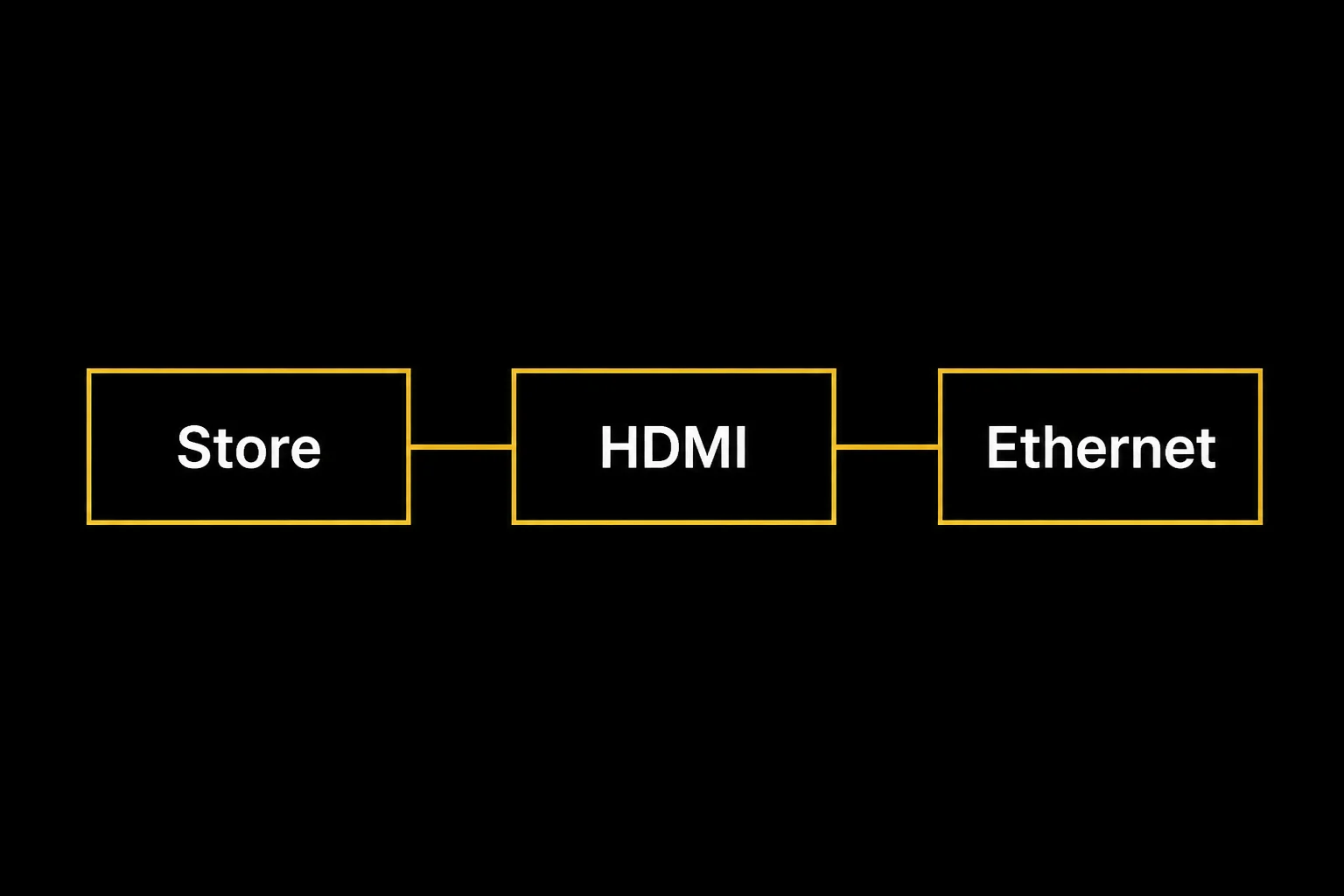
If the stick is your plan, the Fire Stick 4K IPTV setup guide is the click-by-click version. Do not fight webOS for an hour first. That is still IPTV on LG Smart TV UK. The picture just comes through HDMI.
Best IPTV Apps for LG Smart TV UK
These are players. None of them include channels. Pay the app developer only if you want that player on this TV. BritCast plans stay £14 / £24 / £34 / £49 either way.
Use this to choose, then search the Content Store. If the name is missing, skip to HDMI. Do not change the TV country to force a listing.
| App | LG webOS | M3U | Xtream | Price | Best for |
|---|---|---|---|---|---|
| SS IPTV | ✓ | ✓ | — | Free | First test, M3U only |
| IPTV Smarters Player | ✓ | — | ✓ | Free player | Xtream login |
| Nanomid Player | ✓ | ✓ | — | Paid licence | QR / M3U playlist |
| Set IPTV | ✓* | ✓ | — | Paid | Simple MAC setup |
| Smart STB | ✓* | ✓ | — | Paid | Portal / MAG-style login |
| IBO Player | ✓* | ✓ | ✓* | Paid | Guide-style interface |
Pick in this order. Only an M3U and you do not want another bill: SS IPTV. Xtream username and password: IPTV Smarters Player. QR upload from a phone: Nanomid Player (paid player licence). Login is a website plus the TV’s MAC, and you will pay the player once: Set IPTV. You were given a portal URL like a MAG box: Smart STB. You have server URL + username + password and want a denser guide-style app: IBO Player, if it appears in search.
- SS IPTV — Listed for LG on the developer site; playlists are M3U. No player fee on their user pages. ss-iptv.com, M3U docs.
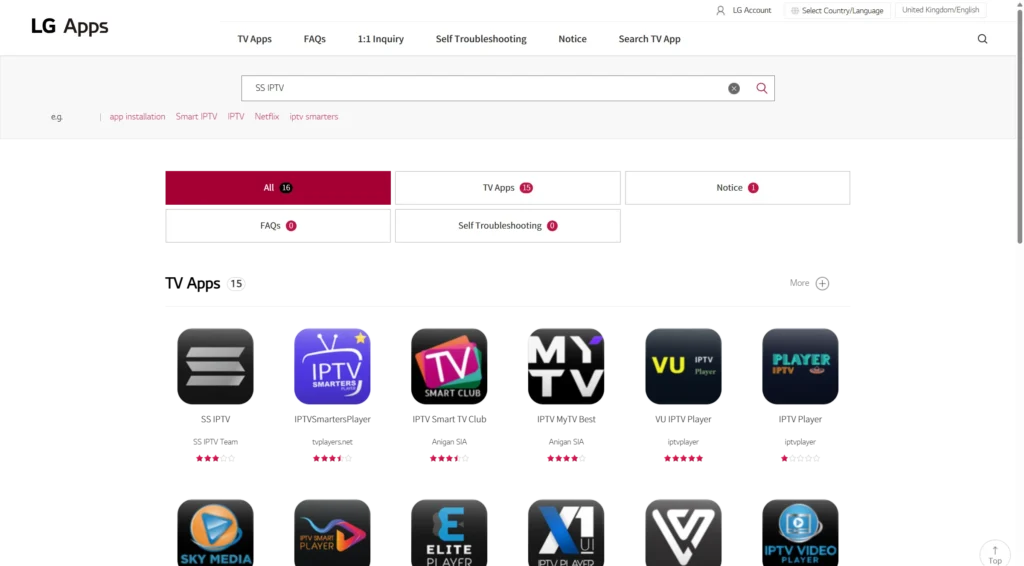
- IPTV Smarters Player — Listed in the UK catalogue as IPTVSmartersPlayer (seller tvplayers.net, v4.4.5). This is the Smarters-family player UK searches look for, not a separate “Lite” tile. Xtream login. Free player; the subscription is separate. UK LG Apps listing.
- Nanomid Player — Listed in the UK catalogue (v1.5.32, updated 22/06/2026). M3U playlists, QR upload from a phone. The player licence is paid one-time on the developer site; price is shown at checkout, not invented here. UK LG Apps listing, nanomid.com licence.
- Set IPTV — 7-day test, then one lifetime activation per device, listed as 165 MAD (about €15.46) on 17 Aug 2026. Official FAQ asks for an M3U link or host/URL plus username and password, so Xtream-shaped logins may still fit even though the table marks Xtream as “try IBO first”. Confirm inside the app. SETSYSTEME activation, FAQ.
- Smart STB — Developer sells Lite and Full licences. Smart TVs: Lite lifetime €6.99; Full yearly €14.99 or lifetime €24.99 (same date). Connects to portals or M3U lists, not an Xtream Codes form. smart-stb.net/prices, LG listing note.
- IBO Player — 7-day trial, then €5 for one year or €10 lifetime on the official activation store (17 Aug 2026). Pay only at the URL the TV screen shows. activation.iboplayer.com.
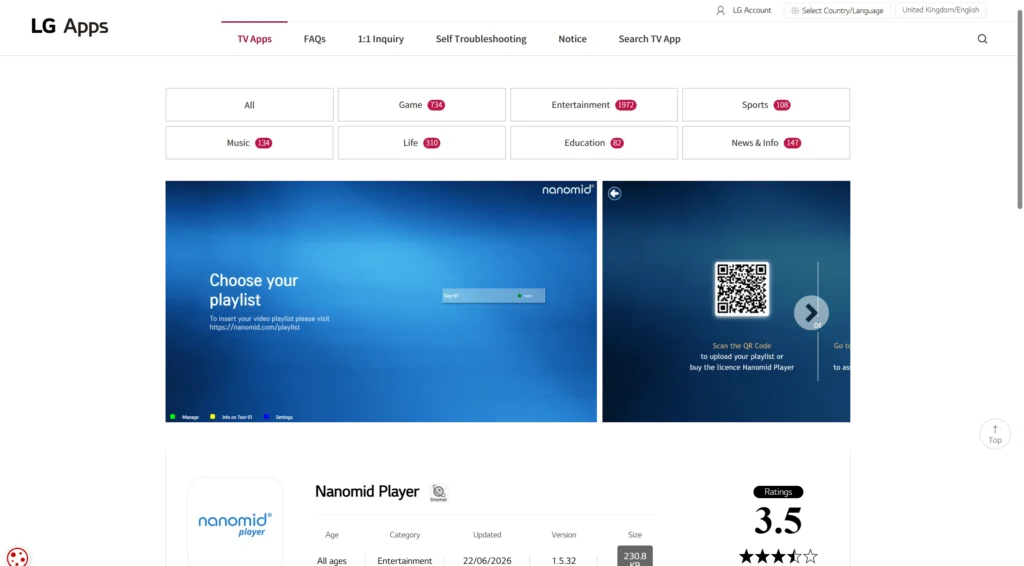
If two free names appear, use SS IPTV for an M3U test and IPTV Smarters Player for Xtream. If the list is huge or the free player feels thin, trial Set or IBO before you pay. If search is empty, stop. HDMI is cheaper than hunting lookalike activation sites.
webOS is not Tizen
Samsung owners live on Tizen. LG is webOS. That is why this page exists. The Samsung walkthrough is IPTV on Samsung Smart TV UK. Copying those app names onto an LG remote is how people waste an evening.
webOS gives you the Magic Remote pointer, which is nicer than a d-pad on a long channel list. It does not give you the same Android app shelf as a Firestick. TiviMate is an Android and Fire TV thing. If that player is the whole point, skip the store and use HDMI. IPTV on LG Smart TV UK does not require TiviMate to “count” as a proper setup.
Path A: install from the LG Content Store
Follow LG, not a screenshot from 2023. This is the native route for IPTV on LG Smart TV UK when the store actually has a player.
Install an IPTV player from the LG Content Store on a UK webOS TV, then add your playlist. Screenshots are from the official UK LG Apps catalogue on 17 August 2026, not a Magic Remote overlay.
Total Time: 15 minutes
Sign in to your LG account
Open TV settings and sign in. The store will not install apps until the LG account is active on that set.
Open the Content Store or Apps area
The label moves with webOS year. On newer UK sets it is LG Apps. Use the Magic Remote pointer.
Search for SS IPTV or IPTV Smarters

On the UK LG Apps catalogue, SS IPTV and IPTVSmartersPlayer both appeared on 17 Aug 2026. If your TV search returns nothing, stop. Do not change the TV country to trick the store.
Install, open, and add your playlist
Install the player. For SS IPTV, Settings shows a connection code you enter on ss-iptv.com with your M3U URL. For IPTV Smarters, type the Xtream host, username and password. Save and reload the list.
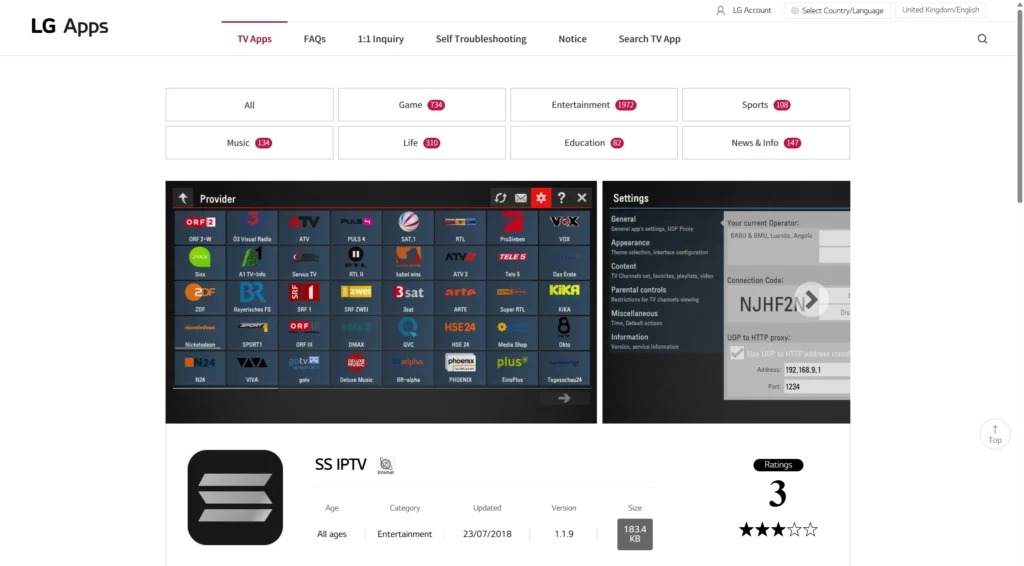
Test the picture on the TV you already own before you pay for a stick you may not need.
If the app asks for a MAC upload on a third-party website, read the URL twice. You are handing the TV’s identity to that site. A username and password login inside the app is simpler.
Store apps are players. They are not the subscription. BritCast plans stay £14 / £24 / £34 / £49 either way. Changing player does not change the price of IPTV on LG Smart TV UK.
Path B: HDMI, when the store shrugs
Plug a Firestick 4K into a spare HDMI socket. Put the TV on that input. Install the player on the stick. Use HDMI-CEC so the LG remote still pauses.
This is the reliable IPTV on LG Smart TV UK setup for older panels, hotel-mode firmware, and anyone who already owns a stick. It also keeps Netflix and iPlayer on the TV apps, and IPTV on the stick, so a store update cannot wipe both.
OLED owners: the panel is not the bottleneck. Wi-Fi behind a wall-mounted set is. Ethernet, or at least 5 GHz, beats another “4K guaranteed” claim. If the Mbps look weak at 8pm, read internet speed for IPTV UK before you blame webOS. Speed problems are not unique to IPTV on LG Smart TV UK. They just show up on a bigger, prettier screen.
What I would not do
I would not pay for a MAG box only because the LG store is awkward. A stick is cheaper, sits behind the TV, and still plays other apps. MAG still has a place for people who want a portal and nothing else. That is a different purchase to IPTV on LG Smart TV UK on the set you already paid for.
I would not sideload random packages onto webOS. That is not how LG’s store works, and it is a good way to brick a living-room TV.
I would not treat AirPlay from a phone as the daily driver. Fine for ten minutes. Miserable for a 90-minute match. Phone mirroring is a demo of IPTV on LG Smart TV UK, not a Saturday setup.
If it installs but will not play
Confirm the login on a phone first. If the phone plays and the TV does not, it is the TV network or the player, not the account.
Reboot the TV after install. webOS is slow to pick up a new app’s storage. Then check that the TV is on 5 GHz, not the slow guest network your kids use for homework.
If the picture freezes only on live sport, that is usually Wi-Fi, not LG. Same order of fixes as Firestick: 5 GHz, Ethernet, fewer extra streams. Do not reinstall the player three times. That rarely repairs IPTV on LG Smart TV UK when the radio link is the fault.
Plans sit on the IPTV subscription page. If the store search is empty, message us on WhatsApp with a photo of the Content Store result and the webOS year from settings. We can tell you to use HDMI instead of guessing.
To see the software year, open Settings and look for webOS or Support. You do not need the exact build number. You need to know whether the Content Store search returns a player. If it does not, HDMI is faster than hunting firmware notes.
SimpLink is LG’s HDMI-CEC label on many remotes. Turn it on in the HDMI settings, then set the Firestick to allow CEC. Volume may stay on the TV speakers even when the stick owns play and pause. That split is normal. It is not a broken install.
If you already paid for a year of broadband and a decent OLED, spend the next twenty minutes on Ethernet or 5 GHz before you spend another twenty on a new box. Hardware rarely fixes a congested radio path. The TV was never the weak part.
Keep the LG account signed in if you stay on Path A. A signed-out store will look empty even when the player exists. That false empty search is the usual reason people think IPTV on LG Smart TV UK is impossible on a new OLED.
Write the Xtream URL on paper before you sit on the floor with the remote. One mistyped character looks like a dead service. The same login should open on a phone. If the phone works, the subscription is not the fault.
FAQ
Does IPTV work on every LG Smart TV?
Recent webOS models can install store apps if LG lists them. Older sets, and some commercial firmware, will not. HDMI still works if the TV has a working HDMI port. That is the honest split for IPTV on LG Smart TV UK households.
Is SS IPTV the official LG player?
No. It is a third-party player that still appears in the UK LG Apps catalogue. LG documents how to install apps. It does not certify a particular IPTV service. If SS IPTV is missing, try IPTV Smarters Player or use HDMI.
Are IPTV Smarters and Nanomid in the UK store?
Yes on the UK LG Apps web catalogue on 17 Aug 2026: IPTVSmartersPlayer and Nanomid Player. Your TV model can still hide a title. Search on the set. If the row is empty, HDMI is the fallback, not a country spoof.
Do I need a Firestick if I have an OLED?
Only if you want a stable player or the store is empty. The OLED already does picture. The stick does apps LG will not host. Plenty of IPTV on LG Smart TV UK living rooms run OLED plus a £40 stick and never open the Content Store again.
Can I use the Magic Remote with a Firestick?
Often yes, via HDMI-CEC (SimpLink on many LG menus). If the remote only changes volume, set the stick’s HDMI-CEC on and pick that HDMI input. You can still use the Fire remote for the app grid. Wrong HDMI input is what breaks playback, not the remote brand.
When the evening test looks clean, BritCast can get you onto a plan without another round of store roulette.