

Most UK homes already have enough internet speed for IPTV UK for a single HD stream. The number that matters is what reaches the Firestick or TV at 8pm, not the figure printed on a broadband bill.
For one screen, Uswitch’s streaming guide still uses a simple ladder: about 3 Mbps for SD, 5 Mbps for HD, 25 Mbps for 4K per device. Netflix’s help page quotes even lower floors for on-demand video (3 Mbps HD / 5 Mbps Full HD / 15 Mbps UHD). Live IPTV is pickier. The bitrate does not always drop as neatly as a catch-up app when the line wobbles, so you want spare capacity.
If you want to prove the line before a long plan, start with an IPTV free trial on the TV you actually sit in front of, during a busy slot. That beats a 20-second test on a laptop in the hallway.
How much internet speed for IPTV UK do you need?
Start with published streaming floors, then add room for the rest of the house.
| Quality | Published floor (one device) | Practical target if others are online |
|---|---|---|
| SD | ~3 Mbps (Uswitch) | 8–10 Mbps |
| HD / 1080p | ~5 Mbps (Uswitch / Netflix FHD) | 15–20 Mbps |
| 4K | 15 Mbps (Netflix UHD) to 25 Mbps (Uswitch) | 35–50 Mbps |
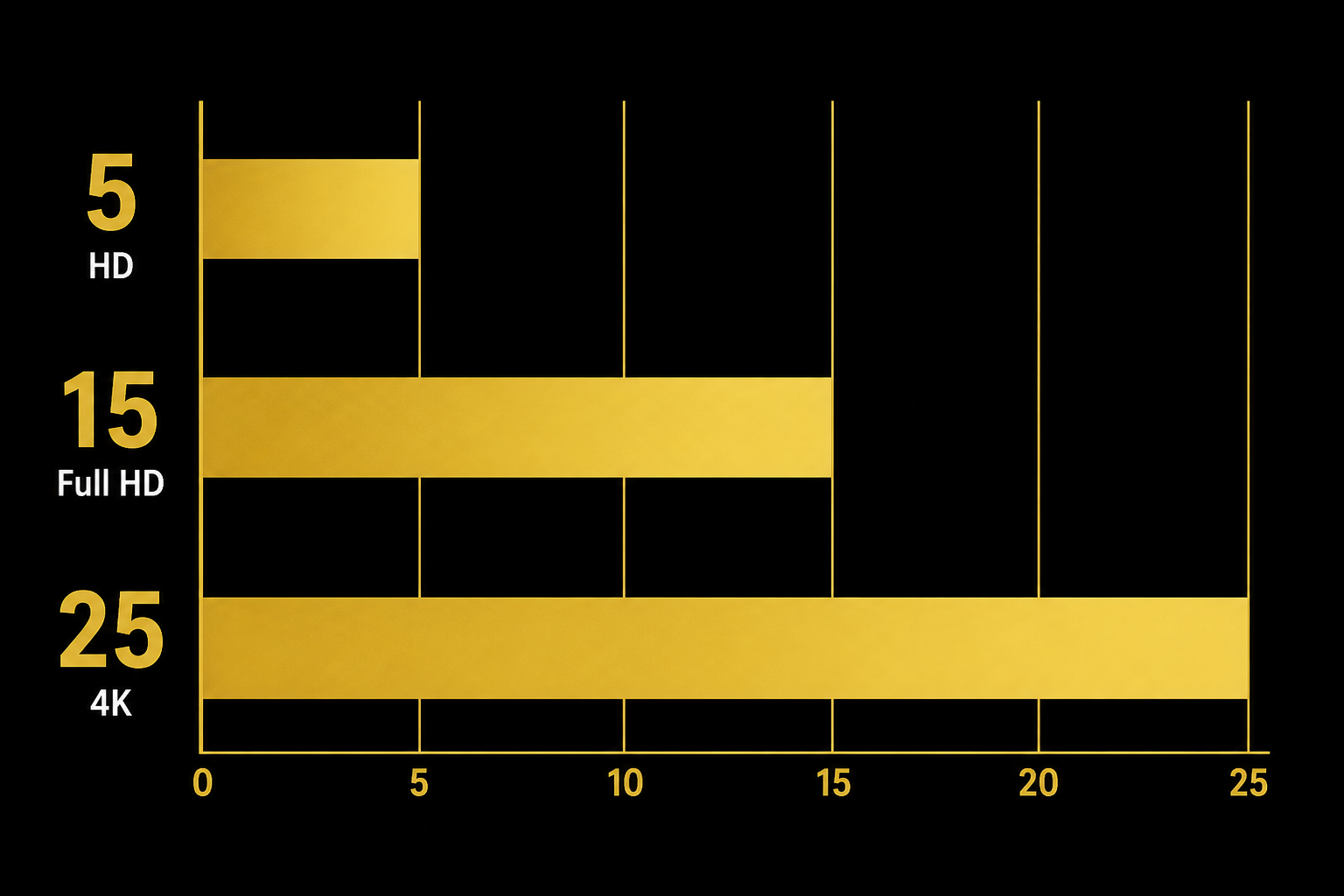
Amazon’s Fire TV help for 4K Ultra HD asks for at least 15 Mbps, and notes some video apps want 20 Mbps. Treat 15 Mbps as a floor for 4K, not a comfort zone on messy Wi-Fi. That is the honest internet speed for IPTV UK picture: published floors plus spare capacity.
Mbps is megabits. Some speed apps flash MB/s (megabytes). Multiply megabytes by eight if you need a rough Mbps figure. Sellers quoting “10 MB” when they mean 10 Mbps will confuse you on purpose. Ask for megabits.
Two HD streams is not “double 5 Mbps on the router and you are done”. Phones, laptops, and cloud backups share the same pipe. If someone is on a video call in the kitchen, plan as if you have less than the pretty speed-test number.
Test the stick, not the hallway laptop
On Fire TV go to Settings → Network, highlight the Wi-Fi name, press play/pause, and run the built-in test. That is the speed the player sees.
A phone next to the router can show 200 Mbps while the stick behind the TV shows 12 Mbps on 2.4 GHz. The service then looks “broken” when the broadband is fine.
Run it twice: mid-afternoon, then between 7pm and 10pm. Evening congestion is common on shared cabinets. If the evening number collapses, that evening figure is the internet speed for IPTV UK that actually counts.
A one-off 400 Mbps burst that lasts three seconds does not help a 90-minute match. Watch the number settle. If it jumps around, Wi-Fi or a busy node is the story, not a missing “premium 4K” tick box.
Wi-Fi is the usual bottleneck
I would rather have a boring 50 Mbps full-fibre line on 5 GHz (or Ethernet) than a 500 Mbps package fighting two brick walls on 2.4 GHz. Wi-Fi, not the package name, is what usually ruins internet speed for IPTV UK.
Do this in order:
- Put the stick on 5 GHz. 2.4 GHz is slower and crowded with neighbours’ routers.
- If the TV is more than a room away, use Ethernet to the stick (USB-C adapter on many 4K models) or a powerline kit as a fallback.
- Pause other 4K streams and big downloads during a match.
- Reboot the router if evening speed is randomly half of daytime for no good reason.
Distance and walls eat more streams than people admit. Moving the router one shelf higher is a dull fix. It still works more often than buying a new Firestick.
This is not a full freeze clinic. If the Mbps look fine and it still stutters, use how to stop IPTV buffering on Firestick. Cache, heat, and a dying HDMI handshake show up the same way as a slow line.
ADSL, fibre, and 4G home broadband
Old copper ADSL that tops out around 10 Mbps can hold one HD stream if nothing else is heavy. On copper, internet speed for IPTV UK is a one-room HD problem. 4K on that line is a gamble. Do not pay for a 4K lock you cannot feed.
FTTC (fibre to the cabinet) is usually enough for HD and often for a single 4K stream. Peak-time slowdowns still happen because the cabinet is shared. FTTP (full fibre to the premises) is calmer if you already run two TVs plus a house full of phones.
4G/5G home routers can work. Mast load and indoor signal matter more than the “up to” speed on the box. Recheck internet speed for IPTV UK at 8pm, not at noon. Test at match time, on the TV, before you buy a long IPTV plan.
You do not need to guess in the abstract. The UK IPTV setup checklist is the short “is this house actually ready?” pass: power, Wi-Fi band, and a working player before money leaves the account.
When a bigger broadband package is wasted money
Upgrade the line if the Firestick test stays under about 15 Mbps at 8pm and you already tried 5 GHz. Do not upgrade because a sales page said “gigabit for 4K”. A faster advert does not raise internet speed for IPTV UK at the stick if the stick is on 2.4 GHz.
A faster package will not rescue a stick on the far side of a stone wall. It will not rescue an overloaded player with ten apps open. And it will not turn a weak 4G indoor signal into a stadium feed.
If HD is stable and you only care about sport in 1080p, stay there. Plenty of living rooms look better at a solid 1080p than at a 4K stream that keeps pausing to catch up.
What this page is not
Ofcom’s note on internet-protocol TV explains that some internet-delivered channels sit outside the usual UK broadcast rules (watershed, and so on). It is consumer advice, not a megabit spec. A seller shouting “guaranteed 4K” is still not a substitute for a test on your Wi-Fi.
BritCast prices do not change with speed: £14 for one month, £24 for three, £34 for six, £49 for twelve. The line only changes whether a 4K lock is worth attempting.
If the numbers are good, set up once
When internet speed for IPTV UK clears HD at 8pm, set the app up once. Once the evening test clears HD comfortably, follow the Fire Stick 4K IPTV setup guide so you are not debugging the app and the Wi-Fi in the same hour.
Plans sit on the IPTV subscription page. If you would rather skip forms, message us on WhatsApp with a screenshot of the Firestick speed test. We can say if HD is realistic before you pick 12 months.
Latency (ping) is not the same as download Mbps. A 40 ms ping with a solid 20 Mbps download is usually fine for live TV. A 200 Mbps download that drops packets every few seconds is not. If the Firestick test shows a high number that will not sit still, treat that as unstable internet speed for IPTV UK, not as a pass.
Read the download figure, not upload. Upload matters for video calls. Live watching is almost all download. If two people stream at once, test with the other stream running. That Saturday number is the internet speed for IPTV UK you will actually get.
FAQ
Is 10 Mbps enough for IPTV in the UK?
For one SD or modest HD stream, often yes, if that 10 Mbps is the internet speed for IPTV UK the Firestick measures at peak time. It is tight for 4K, and it falls over if a laptop starts a backup. Aim nearer 15–20 Mbps to the stick for comfortable HD.
Do I need full fibre for IPTV?
No. Plenty of FTTC homes watch HD without drama. Full fibre helps when you want 4K, two rooms, or a line that does not sag at 8pm. The test on the stick still beats the package name on the bill. Full fibre helps internet speed for IPTV UK stay flat when the street gets busy.
Does a VPN improve internet speed for IPTV?
Sometimes it makes video worse because of the extra hop. Sometimes it helps if an ISP is shaping video traffic. Do not buy a VPN first. Fix 5 GHz or Ethernet, then test again. A VPN will not turn an 8 Mbps ADSL line into 4K, and it is not a shortcut to better internet speed for IPTV UK.
Should I test before I subscribe?
Yes. Watch a busy slot on the TV you will actually use. A short paid month (£14) is cheaper than arguing with a 12-month invoice on a line that cannot hold HD. Send the speed screenshot on WhatsApp if you want a second pair of eyes. We will read it as internet speed for IPTV UK, not as a marketing speed-test.
If the evening test looks healthy, BritCast can get you onto a plan without another round of guesswork.